

Security researchers keep discovering vulnerabilities in smartphones that let attackers get hold of sensitive data, including wallet data and stored seed phrases. The latest example concerns iPhones running outdated iOS, but the principle applies to Android just as much. The good news: with the right storage setup for your Bitcoin, you're well protected.
In March 2026, the Google Threat Intelligence Group published an attack chain called "DarkSword." It has been used since at least November 2025 by commercial surveillance vendors and presumed state-backed actors against targets in Saudi Arabia, Turkey, Malaysia, and Ukraine.
Technically, DarkSword is a good illustration of how these attacks work: the chain links six vulnerabilities in WebKit, Safari, the system loader, and the kernel, taking it all the way from opening a website to full takeover of the device. No app installation or confirmation is required.
Relevant for Bitcoin owners: one of the malware variants involved collects, among other things, messages, the device keychain, iCloud Drive files, notes, photos, and also data from crypto wallets. This means recovery phrases can be affected too, if they're stored in screenshots, notes, or in the cloud.
Apple has since patched the flaws. The topic is still relevant, though: a researcher published the exploit kit on GitHub, which made it available to other attackers as well. So if you haven't updated your device, you remain vulnerable.
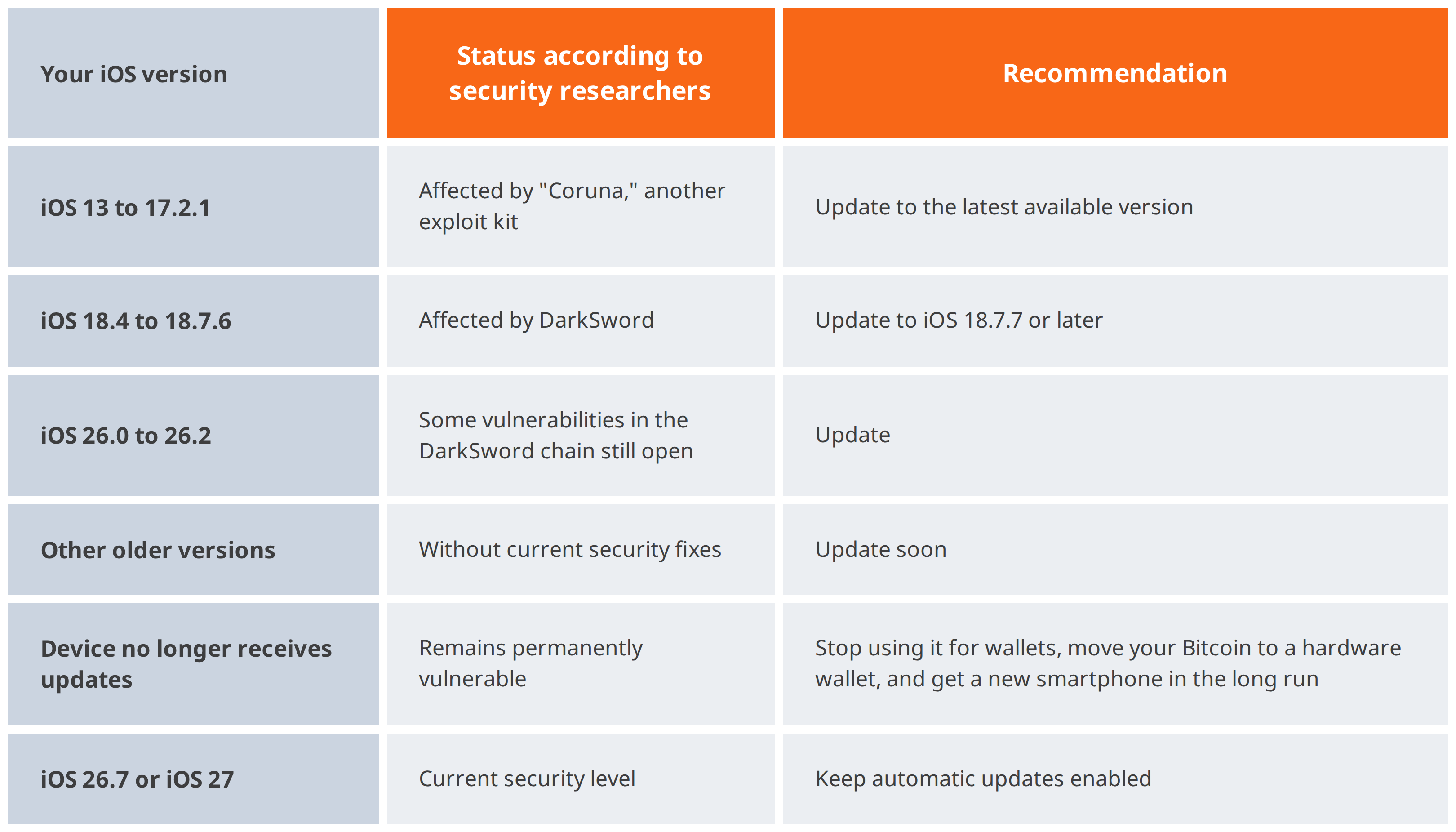
Apple has also released dedicated security updates for older iPhones that can no longer move to the latest iOS version. For you, that means: simply install the latest update your iPhone offers you.
An up-to-date operating system closes known gaps. It doesn't help against vulnerabilities that no one knows about yet. Several of the DarkSword flaws were exploited before Apple was even aware of them. That's not an exception but the normal state of affairs: for every gap that's closed, a new one is eventually found.
That these gaps aren't merely theoretical is shown by a recent case: in September, the app FomoPeek from the official App Store was linked to the theft of around 580,000 US dollars in cryptocurrency. It exploited vulnerabilities in older iOS versions to access data from other apps, such as wallets and notes. On current iPhones, the attack had no effect.
How quickly the situation can change is shown by recent warnings from the security firm SlowMist. Its chief security officer reports that DarkSword has since been adapted to iOS 26.5. Google had originally named only iOS 18.4 to 18.7 as affected. SlowMist even assumes that iPhones from iOS 13 to iOS 26.5 are generally vulnerable via prepared Safari links. These claims have not yet been independently confirmed. But they show why you shouldn't rely on a version being "secure enough": always install updates as soon as possible.
Artificial intelligence is likely to increase this pace. Google observes that attackers are increasingly using AI to search for vulnerabilities, develop exploits, and program malware. In May 2026, Google identified for the first time a zero-day exploit that, by its own assessment, was developed with AI. That said, the same tools also help the defense: Google believes it prevented a planned mass exploitation of this exploit through its own countermeasures.
For you, that means: no smartphone is permanently secure, no matter how up to date it is. A device you use to browse, open messages, and install apps is a good everyday tool, but not the right place for larger savings.
Open Settings > General > About and check your iOS version. Under Settings > General > Software Update, install the latest available version.
You have two equally secure options here: alongside iOS 27, Apple has also released iOS 26.7 with more than 80 security fixes. iOS 27 runs on all iPhones that also support iOS 26. In addition, enable automatic updates so you don't miss future security fixes.
DarkSword only affects iPhones, but Android devices aren't fundamentally more secure. Here too, vulnerabilities are regularly discovered and closed, and here too the same rule applies: an outdated system is vulnerable.
One difference from Apple: with Android, security updates depend on your device's manufacturer. How long and how quickly updates are delivered varies greatly by brand and model. Older or cheaper devices often stop receiving updates after just a few years.
Here's how to check your status:
If your Android device no longer receives security updates, you should stop using it for financial matters or wallets.
The most effective response to unknown vulnerabilities is not to store your private keys on your smartphone in the first place. So keep larger amounts on a hardware wallet. There, your keys never leave the device, and every transaction has to be confirmed directly on the hardware wallet. Even if your smartphone is compromised one day, your Bitcoin stays protected.
A simple rule of thumb: the smartphone wallet is your wallet for everyday use, the hardware wallet is your vault.
When using a hardware wallet:
Don't store your seed phrase as a screenshot, photo, note, in a password manager, by email, or in the cloud. Digital copies are exactly what malware can read out.
If you've been using an outdated iOS or Android version for a while and stored your seed phrase digitally on the device, it's wise to be cautious: after the update, set up a new wallet and transfer your Bitcoin to it.
No reason to panic, but a good occasion for two habits: always keep your smartphone up to date, because that protects you from known attacks. And for larger amounts, don't rely on your smartphone alone, because there will always be new vulnerabilities. With a hardware wallet, your keys are kept where attackers can't reach them.
Looking for a hardware wallet? The BitBox from the Swiss manufacturer BitBox is easy to set up and also available as a Bitcoin-only edition. With the discount code COINFINITY5, you save 5% on your purchase in the BitBox shop.
Prefer not to give any credit card or address details when buying? You can also get hardware wallets directly from us at our shops in Vienna and Graz, anonymously and paying in cash.
Lorem ipsum dolor sit amet, consectetur adipiscing elit, sed do eiusmod tempor incididunt ut labore et dolore magna aliqua. Ut enim ad minim veniam, quis nostrud exercitation ullamco laboris nisi ut aliquip ex ea commodo consequat. Duis aute irure dolor in reprehenderit in voluptate velit esse cillum dolore eu fugiat nulla pariatur.
Block quote
Ordered list
Unordered list
Bold text
Emphasis
Superscript
Subscript